


Hiya AI Phone & Call Assistant
3.0130.00 Reviews
App Specs
- Version
- 1.12.0
- Updated On
- License
- Free
- Downloads
- 10,000+
- Developer
- Hiya
- Categories
- Communication
- Platform
- Android
Screenshots
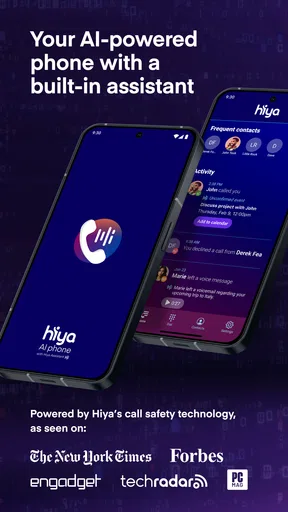
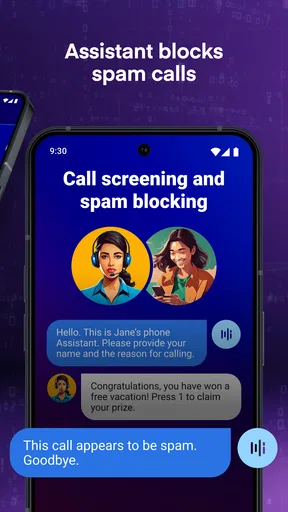
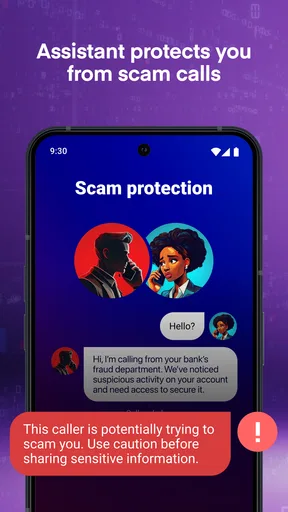
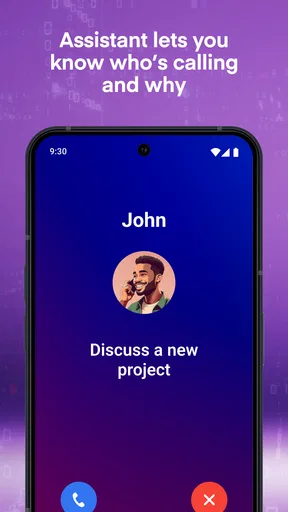
 Analysis by AppCompare
When an unknown number appears while I’m busy, I want enough context to decide whether to answer without turning call screening into another chore. That is the appeal of Hiya AI Phone & Call Assistant: it is a free communication app from Hiya built around AI-assisted screening, fraud protection, and call summaries. I’d consider it most useful for people who regularly receive unfamiliar calls, though its value depends on how well its tools fit the way they already handle calls.
What the app is built to do
Hiya’s focus is narrower than a general messaging or calling suite. It aims to help you judge incoming calls, reduce exposure to suspected fraud, and make calls easier to keep track of. That focus is useful if unknown callers interrupt your day, but it also means the app is not a replacement for your phone’s full communication setup. I would treat it as a screening layer rather than a new home for every conversation.
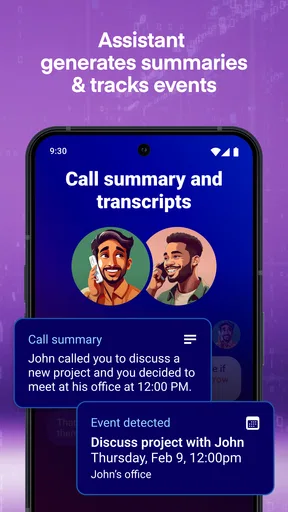
In an everyday situation, imagine you’re waiting for a delivery or a callback about an appointment while working. A number you don’t recognize comes in, and you can’t comfortably answer. Screening can help you make a more considered choice; a summary can be handy later if a call is one you needed to follow up on. That workflow is the practical appeal: less pressure to pick up immediately, and a better chance of keeping the important conversation in mind.
Speed expectations and busy moments
Call tools have to feel timely. A warning that arrives only after you have already answered is not much help, and an interface that takes too long to check during a busy moment can add frustration. Hiya’s purpose is to support decisions around calls, but I would avoid assuming that every caller will be identified perfectly or that every screening result will be instant in every situation. Unknown numbers can be difficult to classify, and no screening tool should be treated as a guarantee that a call is safe or fraudulent.
The most useful habit is to treat any identification as one clue, not a final verdict. If you are expecting a call from a new clinic, contractor, or school, a legitimate number may still be unfamiliar. When the timing matters, use context you already have—such as whether you requested the callback—before declining or blocking. This is a small but important trade-off: stronger screening can save interruptions, while overly aggressive decisions can make it easier to miss a real person.
Heavier use is where expectations matter most. A day with many calls can make screening and follow-up more valuable, but it also gives you more chances to encounter uncertain labels or calls that deserve a closer look. I would not block every unfamiliar number just to keep the call log tidy. A better workflow is to screen first, block only numbers you have good reason to reject, and leave room to revisit a missed call if you were expecting someone.
Where it fits among phone alternatives
Compared with relying only on a phone’s built-in caller controls, Hiya is aimed at people who want a more dedicated layer for call screening and fraud-related protection. Built-in controls may be enough if you rarely receive nuisance calls or prefer to keep everything within the phone’s standard dialer. A separate app makes more sense when unknown calls are a recurring problem and you want call-focused assistance in one place.
Worth Reading Before You Choose

Flipboard Shows What News Apps Must Do Beyond the Feed

Switching to Android Auto Means Rethinking Your Driving Routine

Google Calendar Makes a Crowded Week Easier to Manage

Ludo King Makes the Most of the Minutes Between Plans

Baby Panda World Brings Quick Play to Modern Phones, but Its Game Library Feels Busy

ESPN’s Live Game View Makes Following Close Games Easier
It is also different from simply silencing all unknown callers. Silence can bring peace, but it may hide the very callback you are waiting for. Screening offers a more selective approach, though it asks you to use judgement when a number is unfamiliar. If your main need is texting, contact organization, or a complete communications platform, Hiya’s call-centered purpose may not be the best match.
Who is likely to benefit
I’d look at Hiya if spam and suspicious calls are a regular source of distraction, or if you often need to decide whether to interrupt what you are doing for an unfamiliar number. It may also suit someone who receives legitimate callbacks from changing numbers and wants help handling those calls more thoughtfully. The call-summary angle can be useful when you cannot take notes during a conversation, but I would still check important details directly rather than relying on a summary as the only record.
On the other hand, someone who gets very few unwanted calls may not need another app in their communication routine. It may also be a poor fit if you want every unknown caller blocked automatically, with no chance of a legitimate call slipping through. People who are especially cautious about using AI with communication tools should take time to understand the app’s own settings and terms before making it part of their daily call workflow.
Hiya is rated for Teen users and is free to install, with optional in-app purchases ranging from $9.99 to $99.99 per item. Its average rating is 3.3, based on 241 ratings, and it has 120 written reviews and over 10,000 installs. Those figures offer a little context, but they do not tell me whether the screening experience will suit your particular phone habits. I’d judge it by trying the core workflow carefully rather than expecting a rating to predict how it will handle every call you receive.
Reliability, setup, and device constraints
Reliability is not just whether an app opens; for call screening, it is whether you can understand what it is doing and respond sensibly when a caller is uncertain. I would start by checking the available settings and learning how to review a screened or missed call before depending on the app for important callbacks. That preparation matters more than switching on every protective option at once, especially if your work or family life depends on hearing from new numbers.
Device compatibility is worth checking before installing. Hiya’s current version is 1.12.0 and its minimum OS requirement is 10, so an older device may not be eligible. Even on a compatible phone, the experience of call-related tools can depend on how the phone’s operating system and default communication settings interact with an app. If something does not behave as expected, I would first review the app’s setup and the phone’s call settings rather than assuming the service itself is unavailable.
Hiya was released on January 20, 2025. I would keep it updated when updates are available, particularly for an app whose usefulness depends on current call-handling behavior. The developer is Hiya. As with any app that sits near personal communications, I recommend reading its privacy information and deciding what you are comfortable using before making it part of your routine. I would not infer a particular privacy practice from a feature description alone.
For resource demands, I would be cautious about making broad promises about battery use, storage, or speed across different phones. Your experience can vary with the device and how you use it, and the most revealing test is a normal stretch of daily calls. Notice whether it fits comfortably into your routine, whether the steps to handle a call feel clear, and whether you find yourself checking the app more than you need to. If call screening creates more work than it removes, the phone’s built-in controls may be the better choice.
Making screening work for you
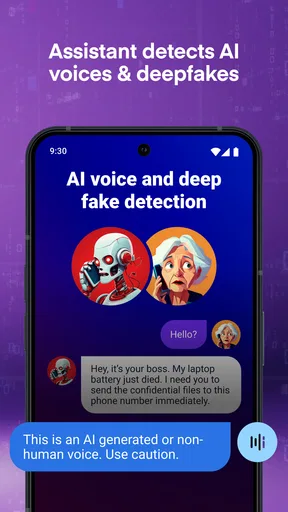
A useful first-week approach is to avoid treating the app as an automatic decision-maker. Pay attention to the difference between a call you were expecting and one that arrives out of nowhere. If a caller is unfamiliar but the timing makes sense, consider verifying through an independent channel before blocking the number. If a call seems suspicious, do not share personal or financial details simply because a caller ID looks reassuring; caller identification is a convenience, not proof of identity.
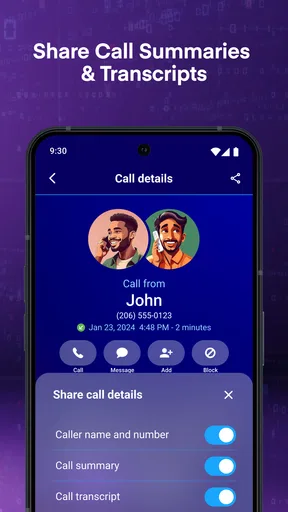
For call summaries, I would use them as a memory aid rather than a substitute for notes on anything consequential. If a caller gives you a deadline, appointment detail, or other information you need to act on, confirm it while you can or record it in a place you trust. Summaries are most helpful when they reduce the effort of recalling the broad point of a conversation, not when you need a perfect transcript or official record.
One practical trade-off is how you handle repeat nuisance callers. Blocking can reduce interruptions, but a long block list can be awkward if you later need to reverse a decision. Before blocking a number that might belong to a business you contacted, consider saving or checking the relevant contact details. Keeping a little context can prevent a helpful filter from becoming the reason you miss a callback.
Using Hiya in real life
First things first, downloading and setting up Hiya AI Phone & Call Assistant is a breeze. Available on both Android and iOS, the app doesn’t weigh down your phone, which is a relief for those of us constantly battling storage issues. Once installed, you’re greeted with a clean and intuitive interface. It’s designed to be user-friendly, so even if you’re not tech-savvy, you’ll find your way around easily.
Blocking Unwanted Calls
One of the standout features is its ability to identify and block spam calls. We all know the frustration of those persistent telemarketers or scam calls, right? With Hiya, those become a thing of the past. The app uses a robust AI-powered database to recognize and flag nuisance numbers, saving you the hassle of dealing with them. Plus, you can customize your block list, giving you control over who can reach you.
Caller ID and Call Management
The caller ID function is another gem. Ever hesitated to pick up a call from an unknown number? Hiya’s caller ID feature displays information about the caller, helping you decide whether to answer or not. It’s like having a little detective in your pocket, and it’s incredibly accurate. I found this particularly useful for screening calls when I was waiting for an important one.
Enhancing Your Communication
Hiya doesn’t just stop at calls. It also offers features that enhance your messaging experience. You can easily identify potential spam messages, and it even provides a platform to report any suspicious activity. The app’s AI continuously learns and updates, ensuring you’re always a step ahead of those pesky scammers.
Performance and Usability
I’ve been using the app for a couple of weeks now, and I have to say, the performance is impressive. It runs smoothly without any noticeable lag, and the battery consumption is minimal. The app’s design is sleek, and navigating through its features feels intuitive. It’s clear the developers put a lot of thought into creating a seamless user experience.
Privacy and Security
In this age of data breaches, privacy is a major concern for all of us. Hiya takes this seriously. The app doesn’t store your call or message data, which is a huge relief. You can enjoy all the benefits without worrying about your personal information being compromised.
Final Thoughts
So, is Hiya AI Phone & Call Assistant worth your time? Absolutely. Whether you’re looking to block spam calls, enhance your call management, or simply have peace of mind knowing your communications are secure, this app delivers on all fronts. It’s a must-have tool for anyone looking to take control of their phone interactions. Give it a try, and you might just find it’s the personal assistant you never knew you needed.
Ready to give your phone a smart upgrade? Check out Hiya on the App Store or Google Play and experience the difference for yourself!
My performance verdict
My overall view is that Hiya makes most sense when unwanted calls are a genuine, repeated problem and you are willing to review uncertain cases rather than hand every decision to an app. Its screening and call-summary purpose gives it a clearer role than a generic communication tool, but that role does not make it essential for everyone. A quiet call history, a preference for built-in controls, or a need for absolute certainty about callers are all good reasons to choose a simpler approach.
I would try it with realistic expectations: let it help you sort incoming calls, keep an eye on missed calls you were expecting, and treat caller information as useful context rather than a guarantee. If that routine saves you interruptions without making you second-guess every ring, the app has earned a place on your phone. If it adds extra steps or you rarely need screening, you can stick with your phone’s usual call tools instead.
Pros
- Intuitive interface for easy navigation.
- Accurate call identification and blocking.
- Customizable settings enhance user control.
- Minimal battery consumption during use.
- Seamless integration with contact lists.
Cons
- Limited features in free version.
- Occasional delays in call identification.
- Requires stable internet connection.
- Some functions need manual setup.
- Ads in free version can be intrusive.
FAQs for Hiya AI Phone & Call Assistant
What is Hiya AI Phone & Call Assistant?
Hiya AI Phone & Call Assistant is a comprehensive app designed to enhance your phone's calling experience. It offers features like call blocking, spam detection, and caller ID, allowing users to manage and identify incoming calls efficiently. The app aims to provide a safer and more organized way to handle phone communications.
How does Hiya AI detect spam calls?
Hiya AI utilizes a powerful database and advanced algorithms to identify and flag spam calls. The app continuously updates its database with information from millions of users to ensure accurate detection. Once a call is recognized as spam, users are notified immediately, allowing them to decide whether to block or ignore the call.
Is Hiya AI Phone & Call Assistant free to use?
Yes, Hiya AI offers a free version with essential features such as spam detection and caller ID. However, for advanced functionalities like customizable call blocking and detailed call insights, users can opt for the premium subscription. The premium plan provides a more robust experience with additional features and regular updates.
Does Hiya AI work on both Android and iOS devices?
Yes, Hiya AI is available for both Android and iOS platforms. The app is designed to work seamlessly across different devices, ensuring a uniform experience for all users. It can be downloaded from the Google Play Store for Android devices and the Apple App Store for iOS devices.
How does Hiya AI ensure user privacy?
Hiya AI is committed to protecting user privacy. The app does not store personal information without consent and provides transparency about data usage. Users have control over their settings, and the app complies with all relevant privacy regulations to safeguard user data against misuse.


